
Petit HDMI RF MODULATOR

PN: H-HDMI-RF-PETIT
Description

Perfect HD up to 1080P/60  HDMI to Coax RF DIGITAL MODULATOR, Network - Ethernet Control

The most unique and cost-effective Networked Digital HDMI RF modulator. Designed to allow any HDMI source like an STB, satellite receiver, HDMI camera, DVD player, Computer, and a ROKU device.You can convert to any RF TV channel of your choice. 

This Thor Modulator is an all-in-one device integrating  HD MPEG2 encoding with AC3 Dolby Audio with an internal digital modulator. Converts HD audio/video signals from any device into DVB-C/T/ATSC/ISDB-T RF output.
The unit supports any HD source with the following video resolutions: 720p, 1080i, 1080p

Simply connect to any PC and control the unit via Thor Broadcast's proprietary GUI which has been touted as being the best on the market.

This unit is plug and play and has exceptional quality for a very low price to help anyone with any budget create their very own RF channel which can be viewed on thousands of televisions simultaneously. 

Features
  • HDMI Input - HDCP compliant ( works with any HDMI device )
  • 10/100 Ethernet NMS port for control, setup, and monitoring
  • RF output could be set to any CATV format as QAM, ATSC, DVB-T, or ISDB-T 
  • RF output power is +24dbmv; enough for distributing HDTV video to 100's TV over the existing coax cable network
  • RF power could be controlled over the network via NMS Gui (Proprietary)
  • MPEG2 video encoding
  • AC3 Audio encoding
  • Video bit rate 1-19.5Mbps can be managed over the network
  • Supports any CATV RF agile channels from 57-1000Mhz, channels  2 -135,
  •  Supports output resolutions up to 1080p
  •  Easy to set up via NMS.
  •  Small size and lightweight
  • Includes wall-mount type rack ears
  •  Install multiple units onto your TV system
  • The powerThe supply is included
  • The HDMI cable is included

Additional optional accessories:

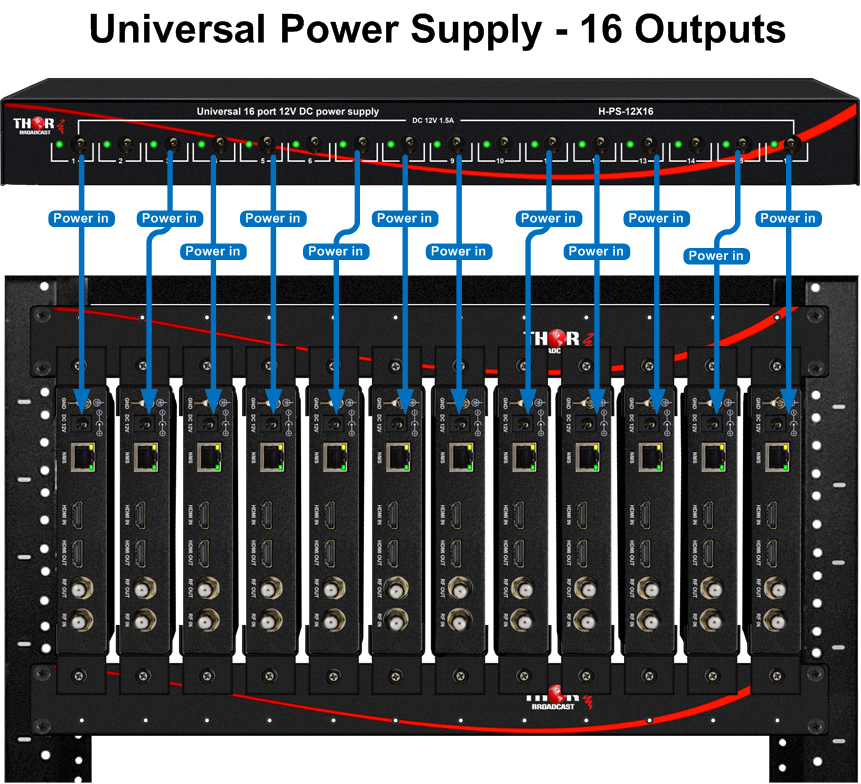
H-PS-12X16 -  Rackmount 19" Power Supply 16 port 12V 1.5A DC



Drawings
Video
THOR - Petit HDMI RF MODULATOR - HDMI to Coax - ATSC QAM DVB-T or ISDB-T - How to set up
Perfect HD up to 1080P/60 HDMI to Coax RF DIGITAL MODULATOR, Network - Ethernet Control https://ebay.us/JVMfNZ The most unique and cost-effective Networked Digital HDMI RF modulator. Designed to allow any HDMI source like an STB, satellite receiver, HDMI camera, DVD player, Computer, and a ROKU device.You can convert to any RF TV channel of your choice. This Thor Modulator is an all-in-one device integrating HD MPEG2 encoding with AC3 Dolby Audio with an internal digital modulator. Converts HD audio/video signals from any device into DVB-C/T/ATSC/ISDB-T RF output. The unit supports any HD source with the following video resolutions: 720p, 1080i, 1080p Simply connect to any PC and control the unit via Thor Broadcast's proprietary GUI which has been touted as being the best on the market. This unit is plug and play and has exceptional quality for a very low price to help anyone with any budget create their very own RF channel which can be viewed on thousands of televisions simultaneously. TO buy one on Ebay https://ebay.us/SCDyni  Features HDMI Input - HDCP compliant ( works with any HDMI device ) 10/100 Ethernet NMS port for control, setup, and monitoring RF output could be set to any CATV format as QAM, ATSC, DVB-T, or ISDB-T RF output power is +24dbmv; enough for distributing HDTV video to 100's TV over existing coax cable network RF power could be controlled over the network via NMS Gui (Proprietary) MPEG2 video encoding AC3 Audio encoding Video bit rate 1-19.5Mbps can managed over the network Supports any CATV RF agile channels form 57-1000Mhz, channels 2 -135, Supports output resolutions up to 1080p Easy to set up via NMS. Small size and light weight Includes wall-mount type rack ears Install multiple units onto your TV system Petit HDMI RF MODULATOR https://thorbroadcast.com/product/petit-hdmi-rf-modulator.html #CoaxtoHDMI #DigitalTVModulator #RFModulator #WirelessHDMI Wireless HDMI - Does it really work THE HAPPY SATELLITE NERD EPISODE 89.1 In this video I talk about a great tool for your #FreeSatelliteTV setup where you can use this modulator to set up your own TV Channel though Coax and have your favourite channel on ATSC 12.1 By default the Petit HDMI RF Modulator broadcasts to Cable QAM Channel 2 but you can move the channel by selecting the up or down button! Come and join our Discord Chat server and chat Satellites https://discord.gg/eCUw7xw https://www.youtube.com/user/ottawaoctane/videos https://www.facebook.com/RobbieStrikeVideos/ https://twitter.com/robbiestrike3 (c) Robbie Strike 2020 http://www.RobbieStrike.com www.FreeSatelliteTV.net
HDMI Modulator QAM ATSC DVB-T ISDB-T NMS IP Connection and Control Instructions for H-HDMI-RF-PETIT
This video shows you how to connect Thor H-HDMI-RF-PETIT to your network. You can control, change any setting such modulated channel number, modulation format, name of your channel and set the VCT, virtual channel number, Increase or decrease RF output power. All IP controlled devices like ours have their own IP address and in order to communicate with it, the PC needs to match the device subnet. for Example our unit static default IP address is 192.168.1.10 and your PC is set to DHCP and IP address is 192.168.0.10, you would need to go and change Your computer nic address to 192.16.1.xx , the xx is between 1-254 but can not be 10, because it would be repeating IP. This is just the nature of TCP/IP Ethernet. The easiest way to verify your IP address is to type in windows CMD and type " ipconfig" , the command prompt will show you the computer network information and IP address. We agree that the IP settings might not be known to all our customers, We made a special step by step document to make it easy, we will also make a video instructional video. Once the device is set to the specific channel and modulation, most likely this is the only time you need to connect it to the device. Please note that most settings you can do on the front of the units, change the channel and modulation. this is the link to the instructions: https://thorbroadcast.com/upload/files/394/how-to-connect-hdmi-rf-petit-to-pc-via-ethernet.pdf This is a link to the product specifications : https://thorbroadcast.com/product/petit-hdmi-rf-modulator.html
BUDGET CHURCH VIDEO DISTRIBUTION | HD Video Over Coax | Thor HDMI RF Petit - REVIEW & INSTALL
Consider supporting us on Patreon ► https://patreon.com/ajaytheceo Thor HDMI RF Petit Modulator ► https://amzn.to/2ZVT9OD 1,000 Ministries Sharing God's Word ► http://bit.ly/1000churches Church Live Streaming 101 - https://modernmediaministry.com OBS Complete Bundle ► https://www.ajaytheceo.com/digital/bundles Subscribe for more! - http://bit.ly/2RkM4TT In this video, I distribute HD video throughout my church over the existing coax in the walls using the Thor RF HDMI Petit Modulator. == TIMESTAMPS == 0:00 - Video Intro 0:08 - Opener 0:23 - Greeting 0:46 - Equipment Needs 1:56 - Unboxing 4:47 - Old Setup vs New Setup 6:22 - Setup at House with PS4 6:45 - Web Interface Setup 10:04 - PS4 HDMI Loop Through Test 10:58 - Previous Gear 11:54 - New Gear Location 12:16 - Antenna Location 13:26 - Gear Installed 15:14 - Configure for Church 18:12 - Sanctuary Feed Testing 19:38 - Connecting HD Antenna 20:05 - Rescanning for Channels 23:24 - Connecting to other TVs 24:07 - Other TVs Setup 24:45 - Final Thoughts 25:53 - Closing Thor HDMI RF Petit Modulator ► https://amzn.to/2ZVT9OD Maker Link ► https://thorbroadcast.com/product/petit-hdmi-rf-modulator-1.html Blog Entry ► https://ajayholmes.com/reviews/27639/ // NEED SOME HELP WITH YOUR MEDIA MINISTRY? // ○ Get The Book - Modern Media Ministry Made Easy - https://amzn.to/2yWGE6M ○ Book A Consultation - https://ajayholmes.com/consultations ○ START A CHURCH PODCAST FOR FREE - https://grow.ajayholmes.com/podcast ○ GROW YOUR CHURCH YOUTUBE CHANNEL - https://grow.ajayholmes.com/youtube-growth ○ CHURCH LIVE STREAMING CHECKLIST - https://grow.ajayholmes.com/live-streaming-checklist ○ GET ORGANIZED - Sermon Details Spreadsheet - https://grow.ajayholmes.com/sermon-details ○ COMPLETE CHURCH LIVE STREAMING 101 COURSE - https://modernmediaministry.com PERFECT AFFORDABLE WEBSITE HOSTING ► http://bit.ly/2OApEdy FREE STOCK ► https://join.robinhood.com/arthurh504 // MY CURRENT VIDEO GEAR // ○ Camcorder - https://amzn.to/2MHWWHl ○ Video Switcher Mini - https://amzn.to/2znkZYQ ○ Wireless Microphone - https://amzn.to/3bYFysu ○ Shotgun Microphone - https://amzn.to/33u9usk ○ Mixer - https://amzn.to/2MlnRtz ○ Lights - https://amzn.to/3cZxnxp ○ Capture Card - https://amzn.to/33qu5xU ○ Drone 1 - https://amzn.to/2MGXsFv ○ Drone 2 - https://amzn.to/32iaTSB ○ Green Screen - https://amzn.to/33vSeTG // JOIN THE COMMUNITY // ► REQUEST TO JOIN TODAY: http://bit.ly/2KragSq 4-M.E. (Modern Media Ministry Made Easy) is a Facebook Group community of people in ministry just like you were we can share and grow together. Ask your questions, share answers, join private Facebook live streams to grow your media ministry. // FOLLOW ME ON SOCIAL // Website ► https://ajayholmes.com Twitch ► https://twitch.com/ajaytheceo Facebook ► https://www.facebook.com/ajaytheceo/ Twitter ► https://twitter.com/ajaytheceo Instagram ► https://www.instagram.com/ajaytheceo/ // LIKE WHAT YOU ARE SEEING HERE? WOULD YOU LIKE TO HELP? // Consider supporting us on Patreon ► https://patreon.com/ajaytheceo Thank you in advance. // MUSIC USED IN VIDEO // provided by Epidemic Sound https://www.epidemicsound.com/referral/49ape6/ // DISCLAIMERS // I am a participant in the Amazon Services LLC Associates Program, an affiliate advertising program designed to provide a means for sites to earn advertising fees by advertising and linking to www.amazon.com. #hdmiovercoax #hdmimodualtor #churchvideodistribution
Broadcast your video to the unlimited TV's build your own private headed HDMI Modulator
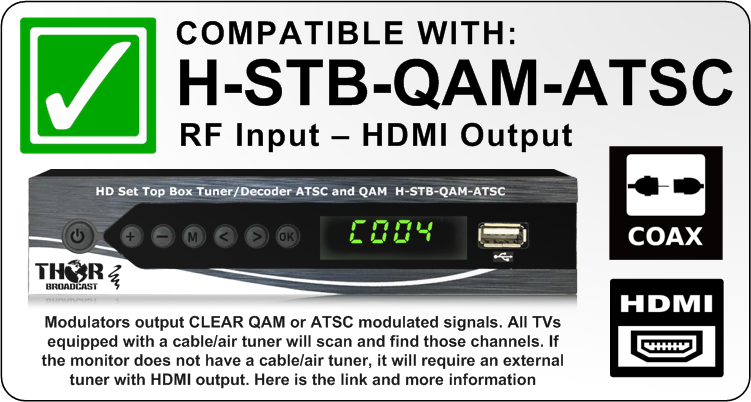
This video shows how to build a broadcast CATV RF headend using Thor Broadcast HDMI modulators. Easy to install digital modulators, similar to when archaic analog modulators were still commonly used. Now you can use any video source like security cameras, computers , DVD players, Roku player, Google Chromecast, Cable TV STB, Satellite STB and other HDMI output devices and send the video out as a modulated channel of your choice. The modulator can generate CATV RF CABLE TV QAM or Off the Air ATSC; or used in foreign countries that use DVB-T or ISDB-T. It's a very convenient system because the front panel show modulated channel and all connections are on the back, like HDMI inputs and RF F-type connector outputs. The RF Outputs can be cascaded or, even better, connected to a 1x12 CATV RF combiner, combined coax will have all 12 or more channels on it; and depending how many TV's the signal is being distributed to, might need to use an inline CATV RF amplifier then distributed using RF splitters and taps. Please note that if the coax distance is very long, Thor manufactures easy to use RF over fiber solutions as well. Please note that if the COAX distance is long Thor offers easy to use RF over fiber solutions as well. Link to 12ch setup : https://thorbroadcast.com/product/petit-hdmi-rf-modulator-chassis-system-for-1-12-units.html/254 Link to 1 pettit modulat : https://thorbroadcast.com/product/petit-hdmi-rf-modulator-1.html Other HDMI modulators and IPTV encoder : https://thorbroadcast.com/products/hdmi sdi over coax : https://thorbroadcast.com/products/sdi-converters-sdi-modulators RF over fiber soution: https://thorbroadcast.com/products/cable-tv-catv-rf-45-900mhz
Model Selection

NMS Video instruction describes how to connect and control the H-HDMI-RF-PETIT via your PC over IP Ethernet Network

This is a link to detailed PDF instructions: H-HDMI-RF-PETIT NMS Connection Instructions


Additional optional accessories:

H-PS-12X16 -  Rackmount 19" Power Supply 16 port 12V 1.5A DC

Application Drawing:
CATV RF Splitters and Combiners : 1x2,1x4, 1x8, 1x16, 1x12,1x24

 

This is a COAX Cable Attenuation chart based on the coax type and frequency. It is very helpful to design and calculate losses within any Coaxial RF distribution system.

Frequency MHz RG-59 dB/100 Ft. RG-59 dB/100 M. RG-6 dB/100 Ft. RG-6 dB/100 M. RG-11 dB/100 Ft. RG-11 dB/100 M.
5 0.89 2.92 0.69 2.26 0.38 1.25
55 1.95 6.4 1.6 5.25 0.97 3.18
211 3.59 11.78 2.87 9.41 1.81 5.94
450 5.3 17.38 4.26 13.97 2.65 8.69
550 5.9 19.35 4.71 15.45 2.94 9.64
750 6.96 22.83 5.59 18.34 3.44 11.28
870 7.54 24.73 6 19.68 3.84 12.6
1000 8.09 26.54 6.54 21.45 4.23 13.87
1450 10.54 34.57 8.3 27.22 5.07 16.63
2250 13.7 44.94 10.6 34.77 6.5 21.32
3000 15.5 50.84 11.9 39.03 7.28 23.96
3500 16.74 54.91 12.85 42.15 8.28 27.16


Attenuation data helps in understanding how much signal loss occurs per unit length of cable at various frequencies, which is crucial for ensuring that the signal strength remains above the required threshold for the system's intended application. This is especially important for long cable runs or for frequencies where the cable type exhibits higher losses.

In designing an RF distribution system, one would typically use such a chart to:

  1. Select the appropriate type of coaxial cable: Depending on the frequency of operation and the allowable signal loss, a designer would choose between types such as RG-59, RG-6, or RG-11.

  2. Calculate total losses: By multiplying the attenuation per unit length by the total cable length, the total expected signal loss can be estimated.

  3. Determine the need for amplifiers: If the signal loss is too high, inline amplifiers might be needed to boost the signal at certain points in the cable run.

  4. Budget for connectors and splices: Each connection or splice in the cable can add additional loss, which needs to be considered in the overall loss budget.

  5. Assess the impact of temperature: Since attenuation can vary with temperature, it's important to consider the environmental conditions in which the cable will operate.
 

Specification

                     Encoding Section-Video

Encoding

MPEG2

Interface

HDMI*1

Resolution

Input

Output

720@60p

Max. 1080@30p

1080@50i

1080@60p

Bit rate

2.000-24.000 Kbps

                     Encoding Section-Audio

Encoding

MPEG-1 Layer2, MPEG-2 AAC, AC3

Sample rate

48KHz

Bit rate

MPEG1 Layer 2 (128Kbps)

MPEG-2 AAC (VBR)

AC3 (128kbps)

System

Management

Ethernet

Language

English

Upgrade

USB/Ethernet

                      Menu Configuration

Basic

RF range/Key ID/ Service Name/ RF attenuation

Advanced

Service provider/Network ID/ ONID/ TS ID/ Service


ID/PMT PID/VPID/APID/PCR PID/Network

                       Modulator Section

MER

Typ. 35dB

RF range

50-950MHz, 1KHz step

RF output level

100 dB ( 70-100 adj )

Standard

ISDB-T

Bandwidth

6M

Constellation

QPSK, 16QAM, 64QAM

Code rate

1/2, 2/3, 3/4, 5/6, 7/8

Guard interval

1/4, 1/8, 1/16, 1/32

FFT

2K, 8K

Standard

DVB-T

Bandwidth

6M, 7M, 8M

Constellation

QPSK, 16QAM, 64QAM

Code rate

1/2, 2/3, 3/4, 5/6, 7/8

Guard interval

1/4, 1/8, 1/16, 1/32

FFT

2K, 8K

Standard

DVB-C J.83A

Constellation

64QAM, 128QAM. 256QAM

Symbol rate

5.000-9.000Msps adj

Standard

DTMB

Bandwidth

8M

Constellation

GB20600-2006

Standard

ATSC

Bandwidth

6M

Constellation

8VSB

Standard

QAM J.83B

Bandwidth

6M

Constellation

64QAM, 256QAM

                                     General

Power supply

12V1A

Dimensions

103*64*24mm

Weight

300g

Question and Answers
Availability:In stock
Condition:New
Shipping:starting at $22.00
Warranty:2Yrs
Price:$469.00